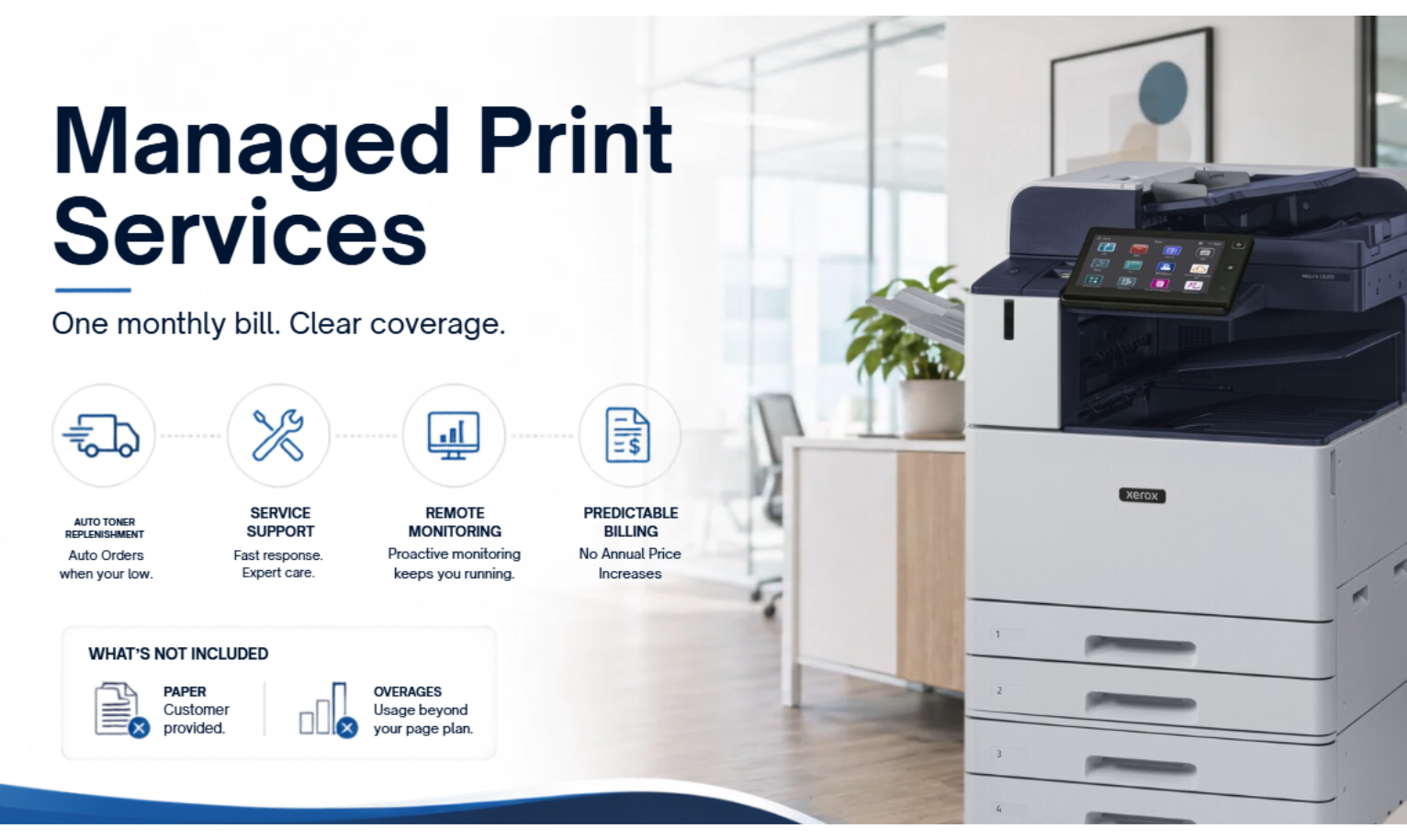
"Managed print" gets thrown around like a feature. It's not. It's a way of buying printers that changes who handles what.
Most offices start with one or two desktop printers, a drawer full of toner cartridges, and a relationship with the local office supply store. It works fine — until the drum dies mid-month, or the IT person spends half a day troubleshooting a paper jam, or someone realizes the company spent $14,000 on toner last year for machines that cost $300.
Managed print services replace that whole mess with a single monthly bill. As a Xerox Platinum Partner, we sell this stuff for a living, so here's exactly what's in the bundle, what isn't, and what the fine print actually says when you cross your monthly page allotment.
1. What's included in managed print services
When you sign a managed print contract, here's what the monthly fee actually pays for:
- The printer itself. Leased to you for the term of the contract, then replaced or extended based on what makes sense at the time.
- All toner and consumables. Shipped automatically before you run out. No supply cabinet, no emergency runs to Staples, no $300 toner cartridge surprise on a Friday.
- On-site service by Xerox-certified technicians. Same-day or next-business-day in our service areas, coordinated nationwide through the Xerox partner network.
- Automatic firmware and security updates. Patches land on the machine without your IT team thinking about it.
- Fleet monitoring. We see toner levels, error codes, and usage patterns remotely, so problems get fixed before you notice them.
That's the whole point of MPS — the predictable cost. You stop buying supplies piecemeal, stop getting invoices from five different vendors, and stop having someone in the office play unofficial printer repair service.
2. What managed print services usually don't include
This is where managed print contracts go sideways if you don't read them. Be honest with your sales rep about which of these matter to you:
- Paper. Almost never included. You buy it, we deliver it with the toner if you want.
- Non-Xerox equipment. If you have a mixed fleet (some Brother, some HP, some Canon), coverage varies. We'll quote what we can cover and tell you what we can't.
- Overage pages above your monthly allotment. Invoiced separately at the per-page rate in your contract once you cross the threshold. Read this part carefully.
- Document workflow software. MPS covers the printer. If you want scan-to-accounting, automated filing, or compliance routing, that's a separate document management engagement.
One more thing worth flagging: your monthly page allotment isn't a one-size-fits-all number. It's sized to your actual print volume during the assessment, based on how your office really runs. A 10-person accounting firm prints differently than a 10-person marketing agency — we set allotments to match.
3. What an overage actually looks like
This is the question almost nobody asks before signing, and almost everybody asks after. Here's a real example:
A VersaLink C7120 on a 60-month FMV lease runs $225/month, with a monthly allotment of 2,500 black-and-white pages and 1,000 color pages. All toner, service, and monitoring is included.
If your office prints 3,000 black-and-white pages in a given month, you'd receive a separate invoice for the 500 overage pages:
Color overages are billed the same way — a separate invoice at $0.07 per page once you cross your monthly color allotment.
So an overage isn't scary, but it shows up. The fix is usually either: bump your monthly allotment up to the next tier, or look at why you're printing more than expected (often it's a one-time project, a busy month, or a workflow that should be digital).
4. How managed print actually saves money
Most of the companies we work with find that managed print costs less than the desktop printers, toner cartridges, and IT time they were paying for separately — often 20–30% less per page, depending on what they're running now.
The math gets better the longer a machine lives. Most machines we lease go about 5 years on the original lease, then another 3–4 years on a service plan before replacement. That's an 8–9 year total lifespan. Same fixed cost, more pages spread across it.
There's a longer breakdown of the math on our Xerox solutions page — including what MPS looks like at the machine and contract level — but the short version is: managed print makes sense once your office is printing a few thousand pages a month and you've got at least one person whose job partly involves keeping the printers alive.
5. When managed print isn't the right fit
Not every office needs MPS. Here's when we tell customers to skip it:
- You're under 5 people. One good desktop laser + a scan-to-email subscription will outperform MPS on cost at low volumes. MPS shines when there's enough printing to justify the dedicated machine and service contract.
- You print less than 1,000 pages a month. Below that, the per-page economics of MPS don't beat a well-set-up desktop fleet. We'll tell you honestly if that's where you are.
- You're a print shop or production environment. MPS covers office MFPs. If you're running 50,000 pages a day, you're looking at production equipment in a different category entirely.
If none of those apply, MPS is usually the right call. It removes a recurring low-grade annoyance (printer problems) and replaces it with a predictable line item your accounting team can plan around.
The 90-second version
Managed print services make sense if: you print at least a few thousand pages a month, your office is tired of dealing with toner and paper jams, and you want one predictable monthly bill instead of five vendors and a part-time printer repair hobby.
Skip MPS if: you're a 2-person shop, you print under 1,000 pages a month, or your business runs on production print equipment that needs its own setup.
The deeper breakdown — including the full "what's included vs. what isn't" treatment — lives on our Xerox solutions page. If you'd rather just talk it through, call 800.893.1183 or request a free fleet assessment online. We'll tell you honestly whether MPS saves you money, or whether a straight lease is the better fit.